Orchestrated containers executors
WfExS-backend with GA4GH Task Execution Service (TES)
WfExS-backend is a workflow execution orchestrator designed to support secure, reproducible, and portable execution of computational workflows.
It simplifies the reproducibility of computational analyses. Rather than manually configuring workflow definitions, software dependencies, container images, and input datasets, researchers can reproduce a previous analysis directly from a Workflow Run RO-Crate (WRROC). WfExS uses contents represented in WRROC standard to automatically reconstruct the execution environment by staging all the required components, including workflow definitions, execution parameters, container images, and reference datasets.
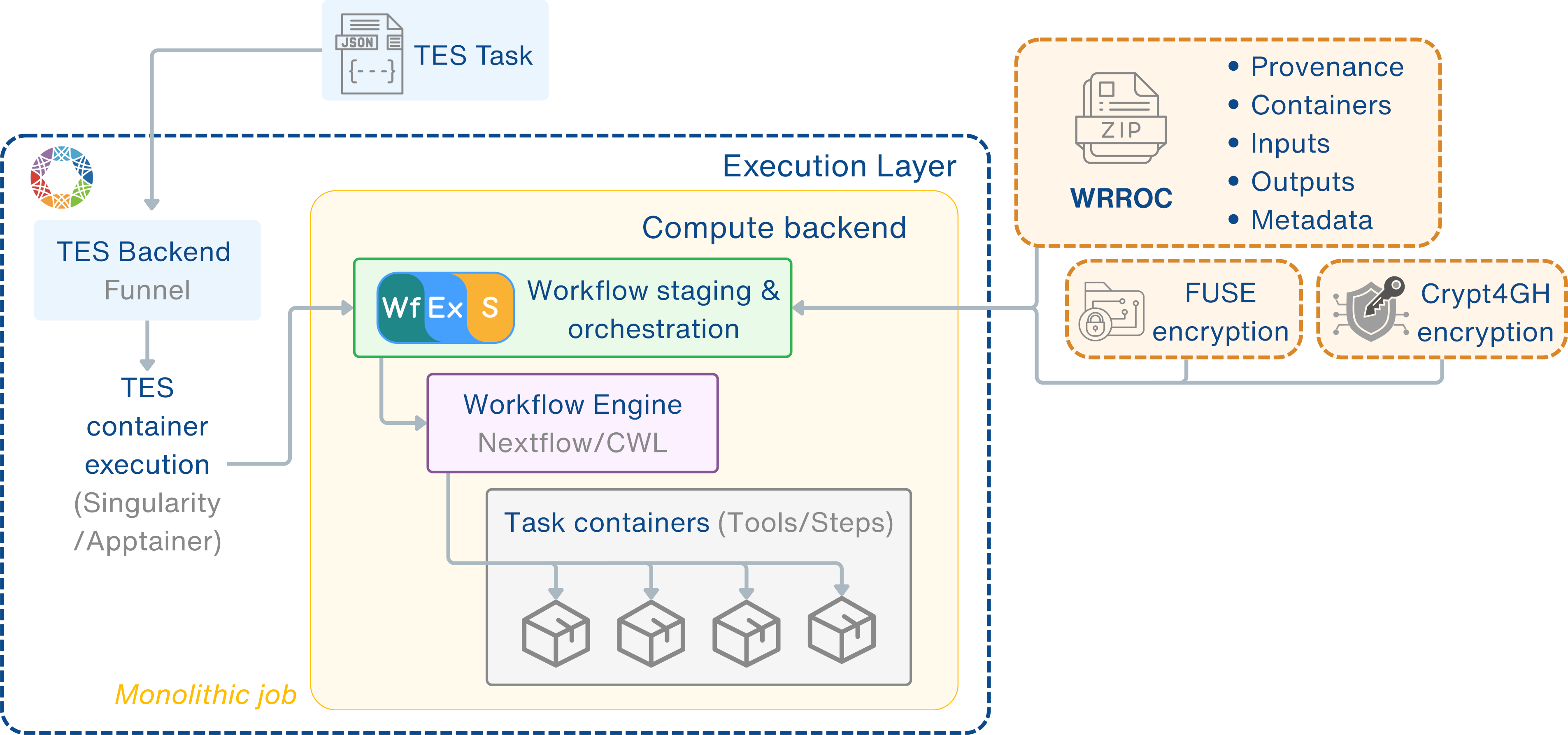
In this deployment, WfExS is integrated with an instance of Funnel, a GA4GH TES service implementation. This deployment uses a customised setup, in order to allow nested container executions. WfExS v1.0.9 itself runs as a container within the TES execution environment, where it prepares and orchestrates the execution of workflow-based analyses. Future developments will allow spawning these inner jobs in the very same or a different TES environment, increasing the technical scalability.
How the WfExS executor works
The execution model is based on a clear separation of responsibilities between orchestration and execution:
- Funnel (GA4GH TES implementation) provides the execution environment and manages computational resources.
- WfExS-backend runs as a task being run within TES service, reconstructing the analysis from a WRROC, staging the required resources, and coordinating execution.
- Workflow engines (e.g. Nextflow) are launched by WfExS-backend, interpreting and executing computational workflows defined in a portable and reproducible manner.
- Computational workflows (e.g. nf-core pipeline, Sarek) define the scientific analysis logic executed on compute resources as a series of containerised tasks.
The overall execution flow is illustrated below.
Checklist for an analysis
Researchers have to submit a complex, raw TES task message, where at least one of the executors is using a WfExS-backend container, in order to execute a workflow analysis. It is highly advisable to use one of the pre-prepared WfExS TES task templates, focused on specific WRROC instances.
As existing life sciences workflows usually are able to perform more than one kind of analysis, or the same one but over different organisms, all the details of a previous, successful execution should be gathered in order to increase the reproducibility of the analyses.
As mentioned in the previous sections, the chosen workflow provenance representation is WRROC. Therefore, the WRROC used for this type of analysis is generated from a previous successful execution and captures the workflow definition (e.g. Nextflow or CWL), its internal and external dependencies, and the default values of the workflow parameters.
The WfExS TES task template must refer to that WRROC, which should be available within the TRE's internal storage. If the TRE allows public internet access, the WRROC referenced within the TES task template could be available in a public repository, like Zenodo. Also, the creator of the TES task template must describe which are the input parameters expected to be set up, like input files or detection thresholds. This is very important, to avoid unwanted changes in critical parameters of the analysis, like the location of the reference datasets or the kind of analysis. Last, but not the least important, due to the complexity of workflows from nf-core, some preparation and marshalling steps might be needed, in the form of additional executors for the task before the execution itself.
Although it is uncommon, it could happen that more than one WfExS TES task template points to the very same WRROC instance. Typical cases would be having some hardcoded bias or threshold parameters, based on internal quality assurance standards, or having more specialised pre-processing machinery, tied to custom, non-standard input formats.
Before writing and executing a workflow using a TES task message pointing to the WfExS executor, researchers and TRE admins should ensure that:
- A Workflow Run RO-Crate (WRROC) describing the analysis is available.
- Required datasets and reference resources are accessible within the TRE (or already cached).
- TES task template of the scenario, describing which parameters can be changed.
- Any modified input parameters must be compatible with the workflow.
Once these requirements are met, one of the executors described within the TES task can direct WfExS to reconstruct the analysis environment with the declared inputs, and submit the whole TES message through TRE infrastructure.
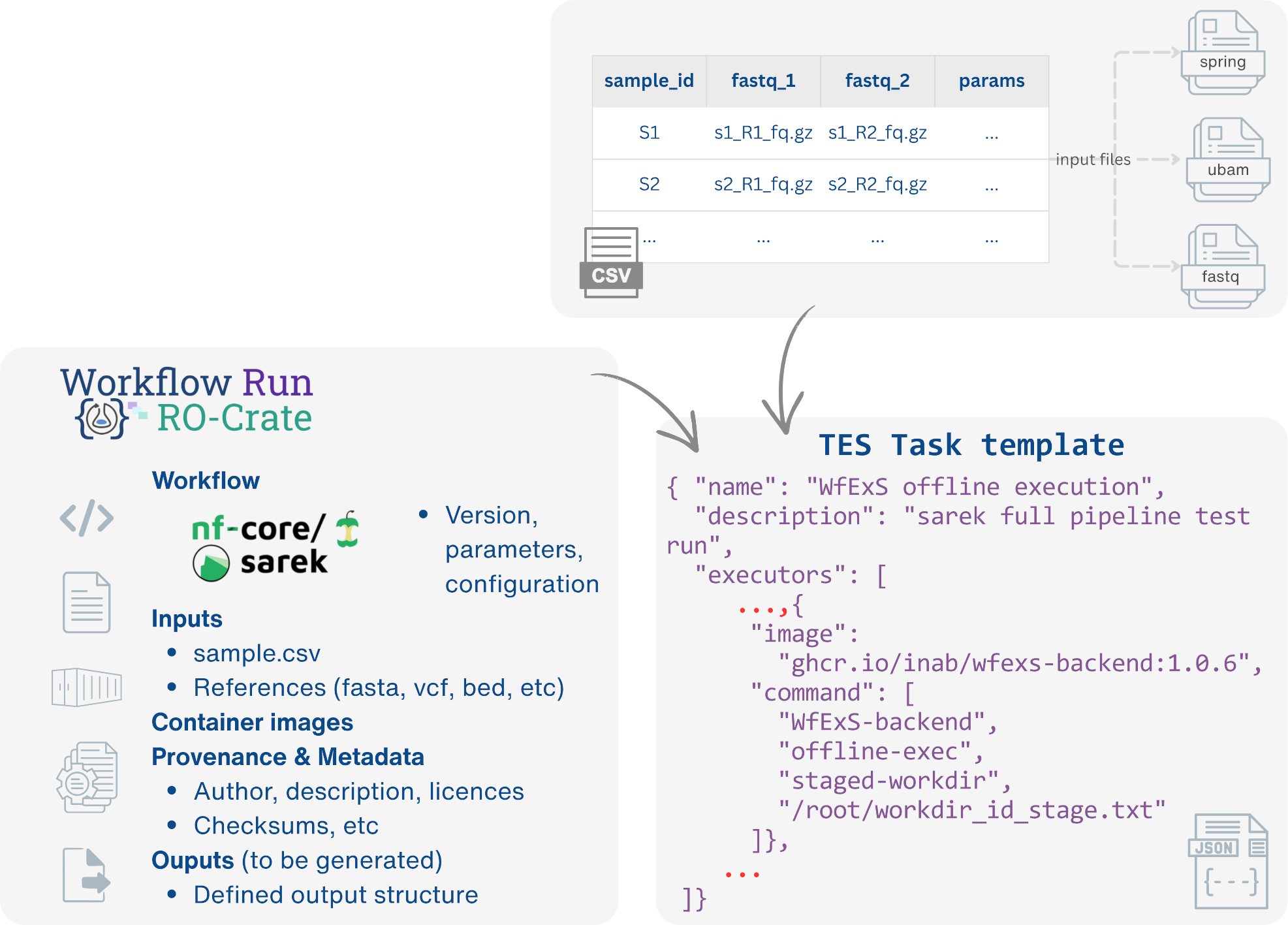
A WfExS TES task template must contain:
- a reference to a Workflow Run RO-Crate (WRROC) describing the analysis.
- execution-specific information, such as the executor configuration and any parameters that may be customised; references to the datasets and resources available within the TRE.
Templates should be provided for each supported workflow so that researchers only need to supply the information that is intended to vary between executions.
Example of minimal TES Task Template:
{
  "name": "WfExS offline execution",
  "description": "wfexs offline execution (stage)",
  "inputs": [
    {
      "name": "__workflow__",
      "description": "Workflow Run RO-Crate workflow snapshot (with pre-configured datasets)",
      "url": "URL:/path/to/WRROC",
      "path": "/container/wrroc.zip"
    },
    {
      "name": "input:1:fastq"
      "url": "URL:/path/to/INPUT",
      "path": "/data/input_1_fastq"
    },
  ],
  "outputs": [
    {
      "name": "output-wrroc",
      "description": "The WRROC which gathered the provenance of the current execution",
      "path": "/outputs/new-wrroc.zip",
      "url": "URL:/output/wrroc/path",
      "type": "FILE"
    }
  ],
  "volumes": [
    "/shared/",
    "/outputs/",
  ],
  "executors": [
    {
      "image": "ubuntu:24.04",
      "command": [
        "/bin/bash",
        "-c",
        "echo 'params:' > /shared/config.wfex.stage && echo '  input:' >> /shared/config.wfex.stage && echo '    c-l-a-s-s: File'  && echo '    preferred-name: input.fastq' && echo '    url: file:///data/input_1_fastq'"
      ],
      "workdir": "/shared",
      "stdout": "/outputs/prepare_params_stdout.log",
      "stdout": "/outputs/prepare_params_stderr.log",
      "ignore_error": false
    },
    {
      "image": "ghcr.io/inab/wfexs-backend:1.0.8",
      "command": [
        "WfExS-backend",
        "import",
        "-R",
        "/container/wrroc.zip",
        "-W",
        "/shared/config.wfex.stage",
        "-s",
        "--save-workdir-id",
        "/shared/workdir_id_stage.txt"
      ],
      "workdir": "/shared",
      "stdout": "/outputs/import_stdout.log",
      "stdout": "/outputs/import_stderr.log",
      "ignore_error": false
    },
    {
      "image": "ghcr.io/inab/wfexs-backend:1.0.8",
      "command": [
        "WfExS-backend",
        "staged-workdir",
        "offline-exec",
        "/shared/workdir_id_stage.txt"
      ],
      "workdir": "/shared",
      "stdout": "/outputs/exec_stdout.log",
      "stdout": "/outputs/exec_stderr.log",
      "ignore_error": false
    },
    {
      "image": "ghcr.io/inab/wfexs-backend:1.0.8",
      "command": [
        "WfExS-backend",
        "staged-workdir",
        "--workflow",
        "--outputs",
        "create-prov-crate",
        "/shared/workdir_id_stage.txt",
        "/outputs/new-wrroc.zip"
      ],
      "workdir": "/shared",
      "stdout": "/outputs/prov_crate_stdout.log",
      "stdout": "/outputs/prov_crate_stderr.log",
      "ignore_error": false
    }
  ]
}
Provenance and RO-Crate model
Once the workflow has finished executing, the researcher receives:
- Workflow outputs: the files generated by the analysis (e.g. reports, result files, and intermediate outputs selected for preservation).
- Execution logs: logs produced during the execution, which can be used to monitor progress, troubleshoot issues, or verify that the workflow completed successfully.
- Workflow Run RO-Crate (WRROC): a machine-readable package describing the execution. The WRROC captures the workflow definition, input parameters, software containers, datasets and reference resources used, execution environment, generated outputs, and associated metadata required to reproduce or reuse the analysis.
Exporting workflow results
The WfExS executor supports the automatic generation of a WRROC as part of the workflow execution. Its generation is controlled through the TES task submitted by the researcher. When preparing a TES task it can be specified that the execution results should be exported as a WRROC. Then WfExS automatically generates the WRROC once the workflow has completed successfully, packaging the workflow outputs together with the execution metadata and provenance information.
The destination directory for the exported WRROC can also be specified in the TES task, allowing researchers to control where the package is written.
This approach removes the need to manually collect output files or assemble provenance metadata, ensuring that the execution can be easily shared, archived, and reproduced.
Security considerations
Researchers should be aware of the following aspects:
- Nested Containerisation Execution: increased complexity to achieve the targeted isolation through FUSE encryption.
- Workflow introspection in an isolated environment: all software dependencies, containers, and workflow resources must be available before execution to avoid issues.
- Controlled filesystem access: careless bind mount and caches might expose sensitive unencrypted host data if not controlled.
- Secret management: how to perform the proper key exchanges needed to decrypt contents on the fly, or safely encrypt results before they are exported.
- Temporary writable storage: it should be encrypted to avoid leakages.
- Persistent tracking & metadata: accountability must be performed wherever it is possible.